
Your first workspace.
Your first qualification rules.
Create an account, add what you sell and connect IndiaMART. Start from your desktop or your phone, with help on WhatsApp when you need it.
Set up Engyne Cloud in five steps
Create your Engyne account
Open app.engyne.space. Continue with Google, or use the email signup option. Your Engyne account is separate from your IndiaMART seller account.
Name your workspace and add products
Give your business a workspace name. Choose domestic, export or both markets, then add the product keywords that describe what you sell.
Connect your IndiaMART seller account
Use your IndiaMART mobile number and the one-time code in the app. Keep the code private. Engyne does not ask for your IndiaMART password.
Review the rules before capture
Check product keywords, exclusions, locations and lead age. Review buyer-quality and verification requirements, your schedule and daily capture cap. Use the profile test to see how your rules evaluate leads.
Monitor from any screen
Review your connection and engine status on Overview. Use Activity to inspect individual decisions and Analytics to follow capture trends. Your trial and plan limits remain visible in the app.
The trial lasts 7 days or 10 captures, whichever comes first, for one seller connection. IndiaMART membership, BuyLead credits and account restrictions remain separate from Engyne.
Set up on your phone.
Keep control on the go.
Open the same account in your phone’s browser. Add Engyne Cloud to your home screen for direct access to your workspace.
Phone installation steps →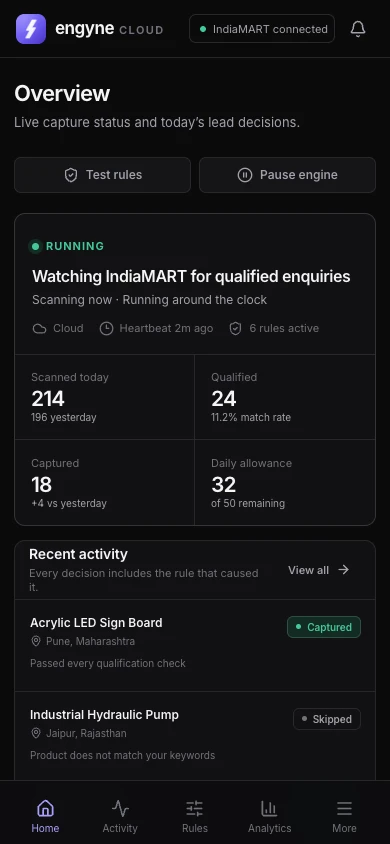
Before you switch on capture
Confirm that the seller account belongs to your business and that you are authorised to connect it. Test your criteria with realistic enquiries, keep a daily cap you are comfortable with and review your first decisions in Activity.
A pause stops scanning and capture. An expired seller session needs reconnection. A closed browser does not stop Cloud capture while your account access, connection, schedule and limits permit it.
Used the old Chrome extension? It has been discontinued. Set up your rules again in Cloud, and contact support if you need help moving a keyword list across.
Explore qualification features · Compare Cloud plans · Read the privacy policy