
How to filter IndiaMART leads by keyword
BuyLeads arrive all day, but only some match what you sell. Here is the exact method we use to set up keyword filtering for Engyne Cloud customers — it works whether you apply it manually or let Engyne Cloud apply it automatically.
To filter IndiaMART leads by keyword: build an approved list from your catalogue in the words buyers actually type, add a restricted list for adjacent products you do not sell, layer on location and quantity rules, then validate in test mode before spending credits. Tune from the rejection log weekly.
Step 1 — List what you actually sell
Open your catalogue, website, or IndiaMART product pages and write down every product family you genuinely serve. Include model names, capacity terms ("500 LPH", "5000L"), and the words buyers use — which are often simpler than your catalogue language. A buyer types "water tank", not "rotomoulded polyethylene storage vessel".
Step 2 — Turn products into approved keywords
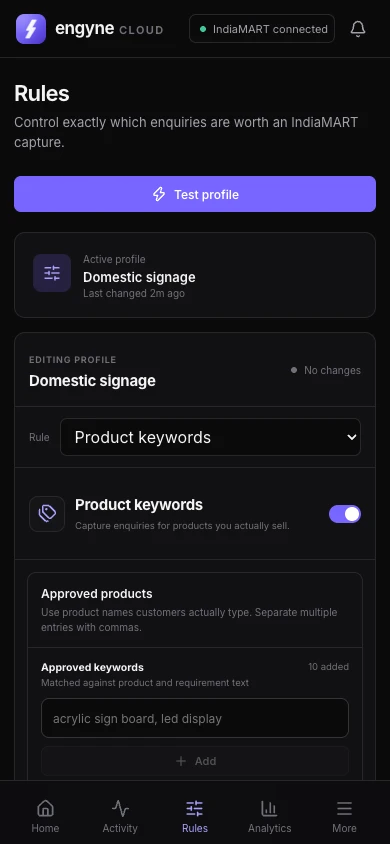
Keywords should be short matching phrases, not full product titles. For an industrial water-treatment supplier the list might start like this:
Most sellers do well starting with 40–80 keywords and growing from live data. Engyne Cloud supports up to 500 approved keywords and automatically dedupes and normalizes them, so bulk-pasting from a spreadsheet is fine.
Step 3 — Add restricted keywords for the noise
Restricted keywords reject a lead even when an approved keyword matches. They catch the "looks similar, but wrong" inquiries that waste the most credits:
Step 4 — Layer location and quality rules
Keywords say what you sell; the other rules say who you can serve. In Engyne Cloud these are toggles applied to every lead alongside the keyword check:
- Location: India state rules for domestic sellers, country rules for exporters.
- Lead age: only act on leads under an hour old, while the buyer is still online.
- Member age / quantity / GST: optional strictness for higher-value categories.
- Contact info required: skip leads where the buyer can't actually be reached.
Step 5 — Run in test mode first
Before spending a single credit, run the filter in test mode: Engyne Cloud scans real BuyLeads, applies every rule, and logs what it would have picked — without picking. One working day of test logs tells you exactly how the keyword list behaves.
Step 6 — Tune from the rejected log
The rejected log is the goldmine. Scan it for leads you would have wanted: each one shows the missing keyword, and Engyne Cloud lets you add it to the approved list directly from the log entry. Do this for the first few sessions and the filter converges fast. This is also the step where we do the tuning with you — it's included in every plan.
Or skip all six steps
Keyword strategy is exactly the part we do for customers. Send your catalogue, website link, or product PDF to support@engyne.space and we'll send back a ready approved + restricted keyword set, load it with you, and tune it after your first live runs — included with every Engyne Cloud plan, along with a year of support.
Want us to build your keyword list?
Send your catalogue to support@engyne.space and get back a ready-to-run keyword set with a demo key — usually the same day.