
IndiaMART BuyLead auto picker that follows your rules
Good BuyLeads disappear in minutes. Engyne Cloud watches the recent BuyLeads page from hosted infrastructure, checks every lead against your approved keywords, location rules, and lead-age limit, and picks the ones that qualify — with an auto-stop limit so your credits stay safe.
An IndiaMART BuyLead auto picker scans recent BuyLeads and consumes the ones matching your rules automatically. Engyne Cloud applies keyword, restricted-term, location, quantity and contact-verification checks, caps each session with an auto-stop limit, and offers a test mode that runs every rule while spending nothing.
Why sellers look for a BuyLead auto picker
On IndiaMART, the sellers who respond first usually win the buyer. But "responding first" means someone on your team has to sit on the recent BuyLeads page, refresh it all day, read every requirement, and decide in seconds whether it's worth a credit. For a seller with a real product line, that is hours of repetitive screen-watching every day — and the best leads still slip through during lunch, meetings, or after hours.
An auto picker changes the job. Instead of your team reading every lead, you define once what a good lead looks like — the product keywords you serve, the locations you sell to, how fresh the lead must be, and whether buyer contact info must be visible — and the tool applies those rules to every lead, every time, without getting tired or distracted.
How Engyne Cloud's auto picker decides
Every visible BuyLead goes through the same checks before a pick happens:
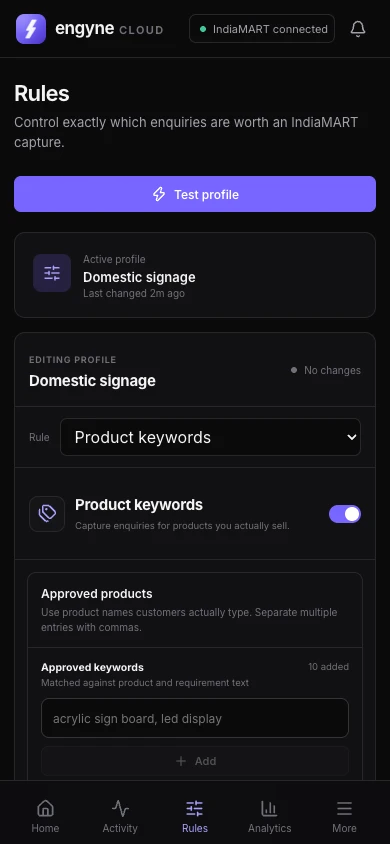
- Approved keywords: the buyer's requirement must match at least one of your product keywords (up to 500, with deduping and normalization).
- Restricted keywords: leads containing your blocked terms are rejected immediately.
- Location rules: India state rules for domestic sellers, or country rules for exporters.
- Lead age: optionally only pick leads under 1 hour old, when the buyer is still active.
- Quality conditions: member age, quantity/order-value minimums, GST verification, and contact-info requirements.
Leads that pass every enabled rule get picked. Everything else is rejected with a reason you can read later in the activity log — so you always know why a lead was or wasn't taken, and the keyword list keeps getting smarter after every session.
Set limits before spending credits
Picking a BuyLead costs credits, so Engyne Cloud treats every pick as spending your money. You can set a max confirmed leads limit that stops the run automatically, and there's a test mode (auto-pick off) that scans and logs decisions without picking anything — the safest way to validate a new keyword set before going live.
Set up with us, not alone
The picker is only as good as its keyword list. That's why every Engyne Cloud plan starts with us building your approved and restricted keyword lists from your catalogue, tuning them after your first live sessions, and staying available on WhatsApp or by email for the whole year. Read more about the full IndiaMART automation workflow or see how keyword filtering works step by step.
BuyLead auto picker FAQ
What is an IndiaMART BuyLead auto picker?
A tool that watches the IndiaMART recent BuyLeads page and picks leads that match your configured rules — keywords, location, lead age, and verification conditions — so your team doesn't have to refresh and read every lead manually.
Will it pick wrong or irrelevant leads?
Engyne Cloud only picks leads that pass every enabled rule, and it has a test mode where it scans and logs decisions without picking anything. You can review the logs, tune the keywords with our help, and only then switch auto-pick on.
Can I limit how many leads it picks?
Yes. Set a max confirmed leads limit and Engyne Cloud stops automatically after that many picks, so your BuyLead credits are protected.
Does the auto picker work while I'm away?
Yes. Capture runs in the cloud during your configured scheduler windows, so it continues while your own computer is closed, and everything it does is logged for later review.
How do I get started?
Message us on WhatsApp with your catalogue or website link. We can help with your keyword set, trial activation and first capture session.
See the auto picker run on your own leads
Send your catalogue to support@engyne.space. We'll set up your keywords, give you a demo key, and run the first session with you in test mode — no credits spent.