
Set up Engyne for Chrome
Install Engyne for Chrome and open the side panel beside IndiaMART. If you need help with activation or your first rules, message us on WhatsApp.
Installing Engyne for Chrome takes about a minute: open the Chrome Web Store listing and click Add to Chrome. Then click the Engyne for Chrome toolbar icon to open the side panel and activate your licence or demo key. Most clients have us do it with them on a screen share.
Install from the Chrome Web Store
One click, and Chrome keeps it updated for you. Takes about a minute.
- Click Add to Chrome below.
- Confirm the permissions Chrome shows you.
- Click the Engyne for Chrome toolbar icon to open the side panel.
- Paste your licence or demo key and press Activate.
Let us set it up with you
Most clients do this instead. We install it on a screen share, load your keyword set, and watch the first run together.
- Send your catalogue or website to our WhatsApp inbox.
- We send back a starting keyword plan and a demo key.
- We help you install and configure Engyne for Chrome through WhatsApp.
- You run it in test mode — nothing is picked, nothing is spent.
- We read the first logs together and tune the rules.
Engyne for Chrome is on the Chrome Web Store, so installs and updates are handled by Chrome. Because every install is paired with a keyword set built from your catalogue, we still configure the rules with you before you run it against live leads.
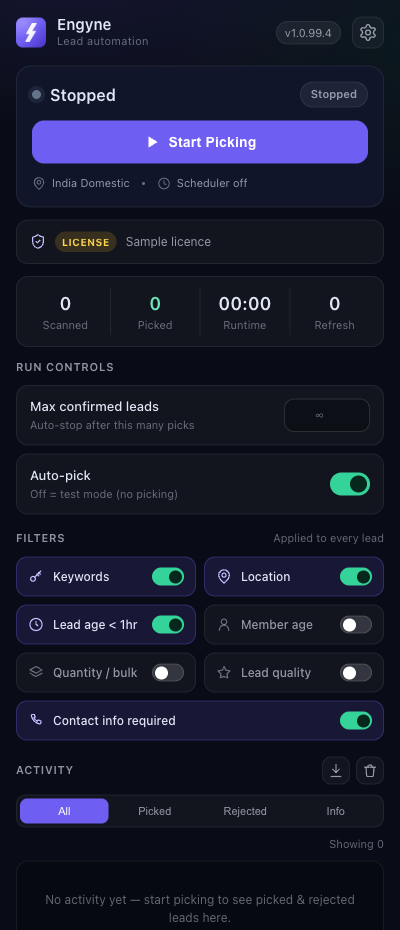
Recognise the current side panel
See exactly how to install, activate your key, and start picking deals.
Installed? Let's load your keywords.
Don't start from a blank extension. Send your catalogue or website link to support@engyne.space and we'll prepare your approved and restricted keyword lists, then tune them after your first live run.